Introduction
Receiving a notification that your Google Ads campaign has been disapproved can be frustrating, especially when your business depends on online lead generation. For repair and IT support companies, Google enforces strict technical support advertising restrictions to protect consumers from misleading or deceptive services.
If your ads have been rejected under the third-party technical support policy, don’t panic. In most cases, the issue can be identified and resolved with the right approach.
This guide explains the most common reasons for Google Ads disapproved tech support ads and provides actionable steps to regain compliance.
Understanding Google’s Technical Support Policy
The Google Ads technical support policy applies to businesses offering support services for technology products, software, devices, or online platforms.
Examples include:
- Computer repair services
- Remote technical support
- Virus and malware removal
- Software troubleshooting
- Device setup assistance
- IT consulting services
Because these services often involve access to consumer devices and personal information, Google applies additional scrutiny to ensure businesses operate transparently.
Why Tech Support Ads Get Rejected
Many businesses unknowingly violate third-party consumer technical support requirements.
Here are the most common reasons.
Misleading Business Claims
One of the biggest causes of ad disapprovals is suggesting an affiliation with a brand when none exists.
For example:
- Claiming to be official support
- Using trademarked brand names incorrectly
- Implying authorization without proof
Always make it clear that your business is an independent service provider.
Lack of Business Transparency
Google wants users to know exactly who they are dealing with.
Your website should clearly display:
- Business name
- Contact information
- Physical address (if applicable)
- Service descriptions
Missing business information can trigger policy concerns.
Unclear Pricing or Service Terms
Customers should understand what services are being offered before they contact your business.
Avoid vague promises and provide accurate descriptions of:
- Services
- Costs
- Refund policies
- Support procedures
Missing Trust Signals
A website without trust elements can raise compliance concerns.
Include:
- Privacy Policy
- Terms of Service
- Contact Page
- Customer Reviews
- Secure HTTPS connection
How to Fix Third-Party Technical Support Policy Violations
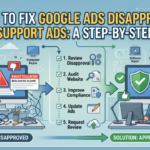
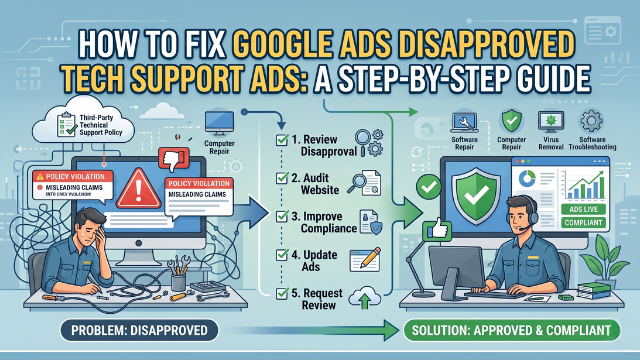
Step 1: Review the Disapproval Notice
Google usually provides information about the policy category causing the issue.
Carefully review:
- Campaign status
- Ad status
- Policy manager notifications
Understanding the exact reason is the first step toward recovery.
Step 2: Audit Your Website
Most compliance problems originate from the website rather than the advertisement itself.
Check every page for:
- Misleading claims
- Brand references
- Missing policies
- Inaccurate service descriptions
Make necessary corrections before requesting a review.
Step 3: Improve Website Compliance
Follow technical support compliance guidelines by ensuring your website includes:
- Transparent business information
- Clear service explanations
- Legitimate contact methods
- Refund and privacy policies
The more trustworthy your website appears, the better your chances of approval.
Step 4: Update Your Ads
Review your ad copy carefully.
Avoid phrases such as:
- Official Support
- Guaranteed Fix
- Certified Brand Support
unless you can legally verify those claims.
Focus on honest, descriptive language that accurately represents your services.
Step 5: Request a Review
Once corrections have been made, submit your ads for review through your Google Ads account.
Google will re-evaluate both your advertisements and landing pages to determine whether they now comply with policy requirements.
How to Prevent Future Ad Disapprovals
Staying compliant requires ongoing monitoring.
Best practices include:
Keep Website Information Updated
Ensure contact details, services, and policies remain accurate.
Follow Advertising Guidelines
Avoid aggressive marketing language or exaggerated promises.
Monitor Policy Changes
Technical support advertising policies can evolve over time. Regular compliance reviews help reduce risk.
Invest in SEO
Businesses relying solely on paid advertising are vulnerable to disruptions.
Local SEO optimization can provide a steady stream of organic traffic and qualified leads without depending entirely on Google Ads.
Benefits of a Compliant Marketing Strategy
Businesses that successfully comply with third-party support services policy requirements often experience:
- Higher ad approval rates
- Increased customer trust
- Better lead quality
- Improved conversion rates
- Reduced risk of account suspension
Compliance and marketing performance go hand in hand.
Conclusion
Google Ads disapproved tech support ads are often caused by website transparency issues, misleading claims, or violations of third-party technical support policy requirements. Fortunately, most issues can be fixed through a thorough compliance audit and website optimization process.
By following technical support compliance guidelines and maintaining a transparent online presence, your business can restore advertising eligibility, attract more customers, and build a stronger foundation for long-term growth.